
Connect Woo-Commerce with Zeopfy Via WhatsApp
Automate order notifications, abandoned cart reminders, payment updates, and customer support messages from WooCommerce to WhatsApp—without manual work or complex setup.
- Automate WhatsApp conversations at scale
- Recover lost sales with smart automation
- Integrate easily with your eCommerce store

Use Cases: How Woo-Commerce + Zepofy Drives Growth
Integrate WooCommerce with Zepofy to automate WhatsApp Marketing messaging, increase conversions, reduce manual work, and enhance customer experience.

Recover Abandoned Carts
Send automated WhatsApp reminders for incomplete checkouts to recover lost sales and convert high-intent customers quickly.
Order Status Notifications
Deliver instant WhatsApp updates for order confirmation, shipping, and delivery to keep customers informed and reduce support requests.

COD Order Confirmation
Confirm cash-on-delivery orders via WhatsApp to reduce fake orders, lower returns, and improve successful deliveries.

Customer Feedback Collection
Request product reviews and post-purchase feedback on WhatsApp to build trust and improve store credibility.

Repeat Purchase Reminders
Send automated restock reminders on WhatsApp to boost repeat purchases and increase customer lifetime value.

Promotional Campaign Messaging
Run targeted WhatsApp campaigns for offers, launches, and seasonal sales to drive engagement and conversions.
Connect Woo-Commerce Zepofy in Simple Steps
Integrate WooCommerce with Zepofy to automate WhatsApp order updates, cart reminders, and customer communication without complex setup.
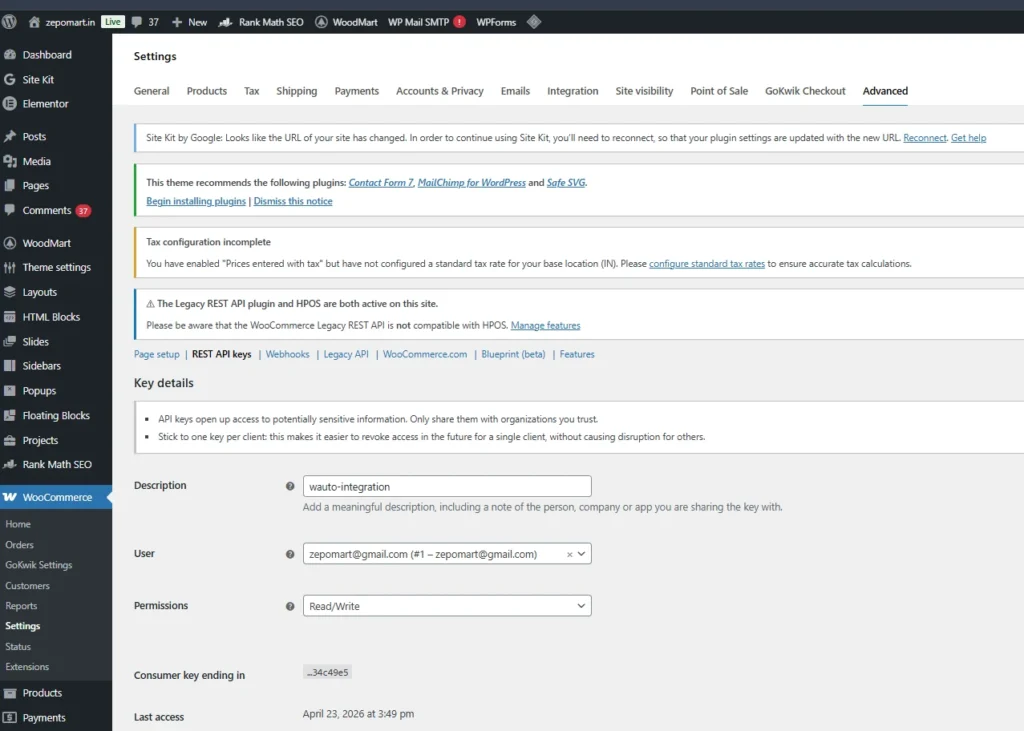
Step 1: Access Settings
- Login to WordPress dashboard and open settings
- Open WooCommerce plugin settings section
- Navigate to advanced tab inside WooCommerce settings
- Open REST API section for integration setup
Step 2: Generate API Credentials
- Click add key to create new API credentials
- Enter description for API key identification purpose
- Select read and write access permissions properly
- Generate keys and copy consumer key and secret
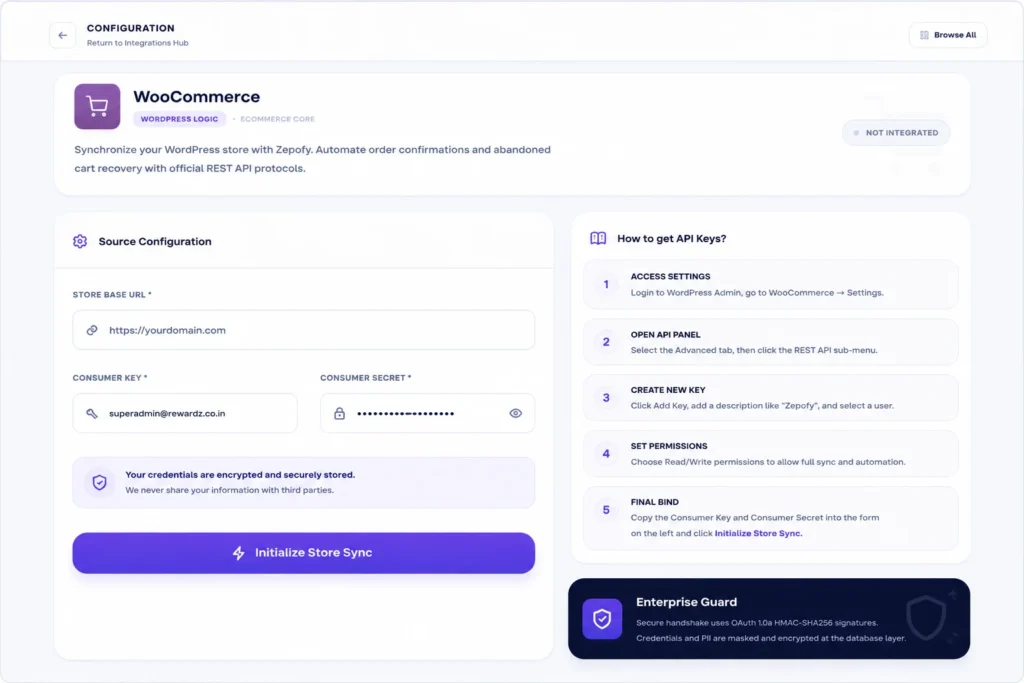
Step 3: Connect with Zepofy
- Login to Zepofy dashboard and open integration section
- Enter your store URL in required input field
- Paste consumer key and secret in credentials section
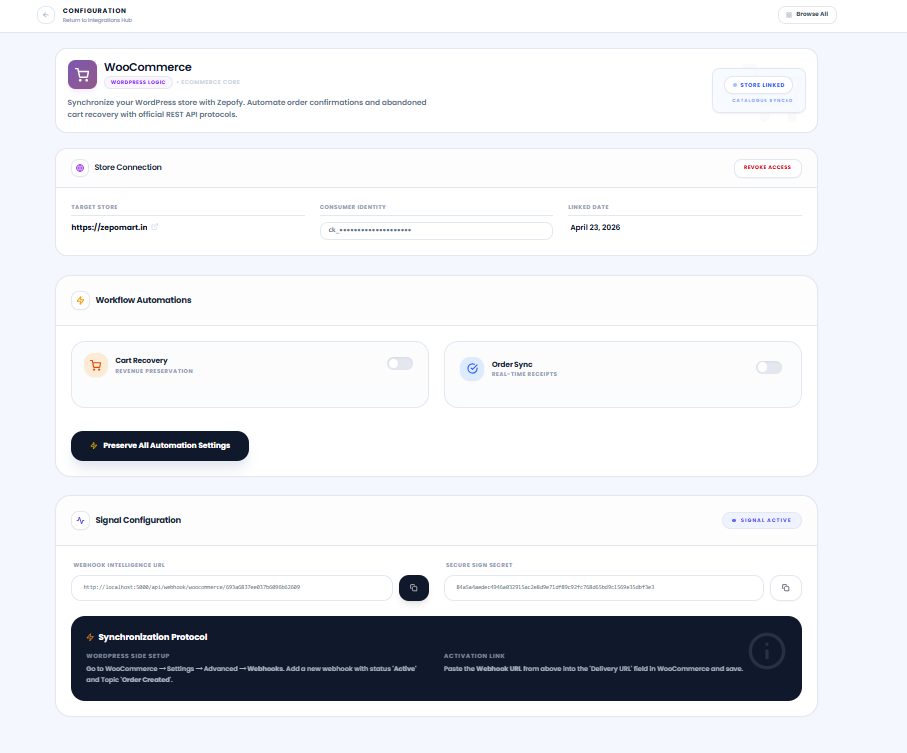
- Click start sync and verify connection status
Step 4: Automate Store
- Sync products and categories automatically with system
- Enable order notifications for real time updates
- Track customer activities and order related actions
- Setup abandoned cart recovery for better conversions
Ready to Automate WhatsApp for Your Business?
Set up WhatsApp Business API, chatbots, broadcasts, and integrations — all in one place.
FAQ's
What is Zepofy WooCommerce integration?
Zepofy WooCommerce integration connects your WooCommerce store with WhatsApp Business API to automate order notifications, cart recovery, customer updates, and real-time WhatsApp communication.
Does Zepofy support WooCommerce abandoned cart recovery?
Absolutely. Zepofy enables WhatsApp abandoned cart recovery by sending automated reminders to customers who leave products in their cart without completing checkout.
Can I send promotional WhatsApp messages to WooCommerce customers?
Yes, you can run WhatsApp promotional campaigns, offers, and discount alerts for WooCommerce customers using approved templates and audience segmentation.
Zepofy syncs WooCommerce orders, customer details, and cart events in real time, enabling instant WhatsApp messages based on customer actions.
Yes, zepfy is designed for businesses of all sizes—from small teams to large enterprises—looking to scale WhatsApp communication professionally.
How long does it take to connect WooCommerce with Zepofy?
Most WooCommerce stores can complete WhatsApp integration with Zepofy within minutes, including API connection, data sync, and basic automation setup.