
Connect WhatsApp Business API with Zepofy
Integrate the official WhatsApp Business API with Zepofy to automate messaging, manage conversations, send notifications, and scale secure business communication through a centralized WhatsApp automation platform.
- Automate WhatsApp conversations at scale
- Recover lost sales with smart automation
- Integrate easily with your eCommerce store
Use Cases: How WhatsApp API + Zepofy Drives Growth
Zepofy connects the WhatsApp Business API with automation workflows to improve engagement, faster responses, and scalable customer communication.

Automate Customer Notifications
Send transactional WhatsApp messages for confirmations, alerts, and updates using WhatsApp API automation triggered by real-time business actions.

Two-Way Business Conversations
Enable customers to reply, ask questions, and interact through WhatsApp using automated yet conversational messaging flows.

Centralize Customer Communication
Manage all WhatsApp API conversations from one unified inbox to streamline support, sales, and customer queries.

Reduce Manual Support Workload
Automate common questions and routine replies with WhatsApp API workflows to improve speed and team efficiency.

Engage Customers at Scale
Send bulk notifications, reminders, and updates via WhatsApp API while maintaining personalization and compliance.

Track Messaging Performance
Monitor delivery rates, responses, and engagement metrics to optimize WhatsApp API communication strategies.
Connect WhatsApp API with Zepofy in Simple Steps
Follow these steps to connect the official WhatsApp Business API with Zepofy and automate communication.
Step 1: Setup Business Account
- Sign in to your Meta Business Manager account
- Create a new WhatsApp Business Account (WABA) or select an existing one
- Add and verify your business details (name, address, website, etc.)
- Complete business verification if required
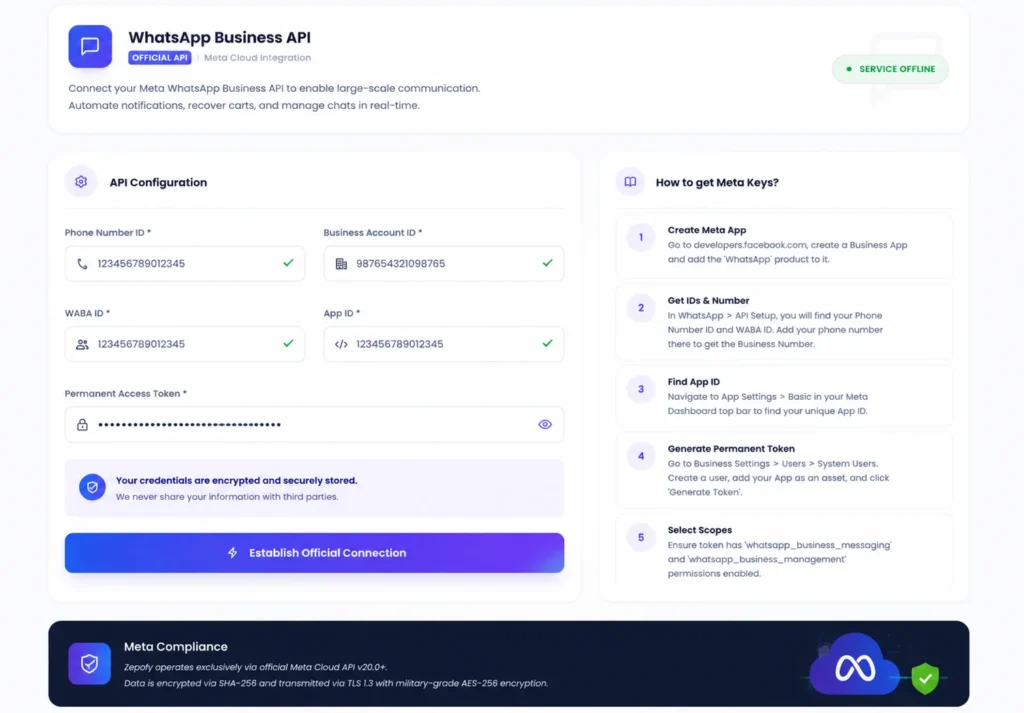
Step 2: Get API Credentials
- Generate your Phone Number ID and WhatsApp Business Account ID (WABA ID)
- Create a Permanent Access Token for secure API access
- Copy your App ID from the developer dashboard
- Keep all credentials safe for integration use
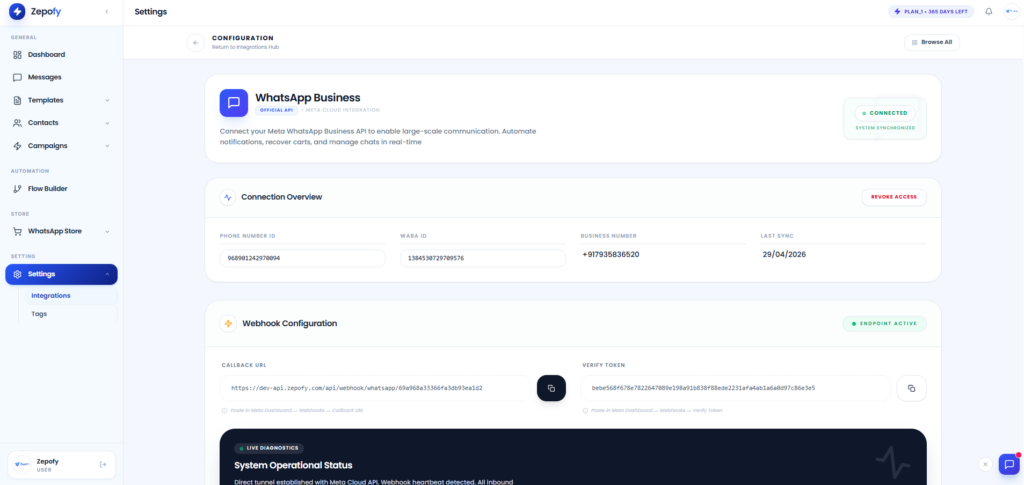
Step 3: Connect with Zepofy
- Log in to your Zepofy dashboard
- Enter the required API credentials (Phone Number ID, WABA ID, Access Token, App ID)
- Click on “Establish Connection”
- Verify connection status to ensure successful integration
Step 4: Start Messaging
- Create and submit message templates for approval
- Send a test message to confirm setup is working
- Launch messaging campaigns using approved templates
- Monitor delivery and engagement
Ready to Automate WhatsApp for Your Business?
Set up WhatsApp Business API, chatbots, broadcasts, and integrations — all in one place.
FAQ's
How is WhatsApp API different from normal WhatsApp Business?
WhatsApp API supports automation, multi-user access, and high-volume messaging, while standard WhatsApp Business is limited to manual use.
Can I send bulk messages using WhatsApp API?
Yes, Zepofy enables bulk WhatsApp notifications using approved templates while following WhatsApp API policies.
Do I need technical knowledge to connect WhatsApp API?
No, Zepofy provides a guided setup that does not require coding or technical expertise.
How long does WhatsApp API integration take?
Most businesses can complete WhatsApp API integration with Zepofy within a short setup time after verification.
Will WhatsApp API integration affect message delivery speed?
No, Zepofy ensures reliable and optimized message delivery using official WhatsApp Business API infrastructure.