
Boost Your WhatsApp Commerce Sales with Zepofy
Integrate your store with Zepofy to automate WhatsApp conversations, manage orders, and convert chats into sales — all in one powerful platform designed to boost revenue, engagement, and customer satisfaction effortlessly.
- Automate WhatsApp conversations at scale
- Recover lost sales with smart automation
- Integrate easily with your eCommerce store

Use Cases: How WhatsApp Commerce + Zepofy Drives Sales
Zepofy connects your eCommerce store with WhatsApp to automate conversations, capture customer intent, and increase conversions through real-time engagement.

Convert Chats into Orders
Turn WhatsApp conversations into direct purchases by sharing catalogs, pricing, and instant checkout links, helping customers decide faster and complete orders easily.

Abandoned Cart Recovery
Automatically reminds customers on WhatsApp when they leave checkout without payment, encouraging them to return, complete purchases, and recover lost sales efficiently.

Product Discovery via Chat
Allow customers to explore products directly on WhatsApp with catalogs, recommendations, and quick replies, improving engagement and simplifying the buying journey.

Order Confirmation & Updates
Send real-time order confirmations, shipping alerts, and delivery updates through WhatsApp to keep customers informed and reduce unnecessary support queries.

WhatsApp Payments & Checkout
Enable seamless checkout with WhatsApp payment links, allowing customers to complete purchases quickly, reducing drop-offs and improving overall transaction success rates.

ustomer Support Automation
Automate responses for FAQs, order queries, and support requests on WhatsApp, providing instant assistance while reducing workload and improving customer satisfaction.
Connect WhatsApp Commerce with Zepofy in Simple Steps
Follow these steps to integrate WhatsApp Commerce with Zepofy and start automating sales, orders, and customer conversations seamlessly.
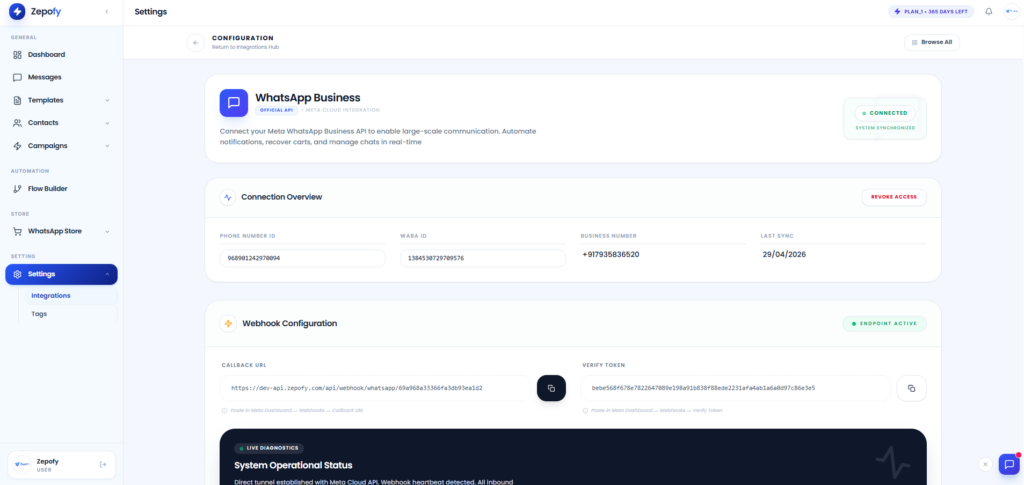
Step 1: Connect API
- Ensure WhatsApp Business API is connected properly to your system
- Verify your business account details and approval status
- Enable messaging features from WhatsApp business settings panel
- Check API connection status to confirm successful integration
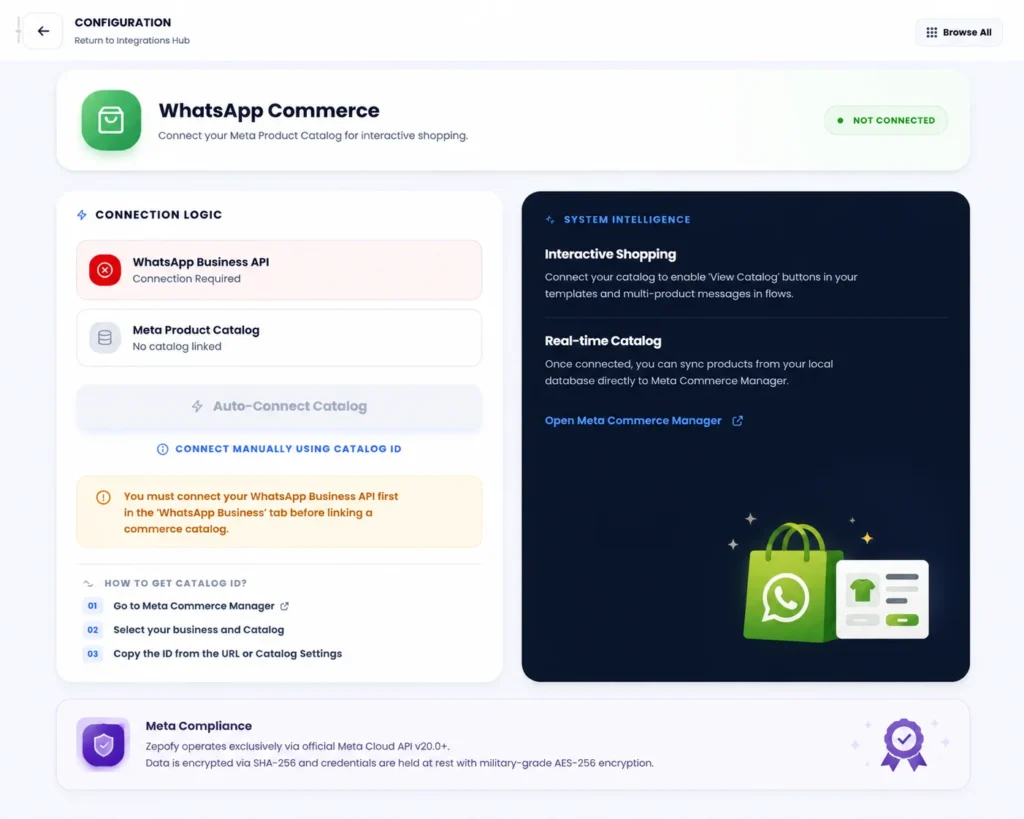
Step 2: Setup Catalog
- Open Meta Commerce Manager from your business dashboard
- Create new catalog or select existing product catalog
- Add products with images pricing and descriptions properly
- Organize catalog categories for better product browsing experience
Step 3: Link to Zepofy
- Enter catalog ID in Zepofy integration setup section
- Connect catalog with Zepofy using provided credentials
- Sync catalog data between platforms for real time updates
- Verify connection status to ensure proper catalog integration
Step 4: Start Selling
- Send product messages directly to customers on WhatsApp
- Use catalog buttons for easy product browsing experience
- Enable quick purchase flow using integrated chat options
- Monitor sales and customer interactions from dashboard panel
Ready to Automate WhatsApp for Your Business?
Set up WhatsApp Business API, chatbots, broadcasts, and integrations — all in one place.
FAQ's
What is Shopify Checkout integration with Zepofy?
Shopify Checkout integration connects the checkout stage with WhatsApp automation to recover abandoned checkouts and engage high-intent buyers instantly.
Do I need WhatsApp Business API for checkout integration?
Yes, Zepofy uses the official WhatsApp Business API to send compliant and scalable checkout recovery messages.
Is Shopify Checkout WhatsApp integration secure?
Yes, Zepofy uses encrypted data handling and secure permissions for checkout data access.
Can I use Shopify and Checkout integrations together?
Yes, combining both provides full WhatsApp automation from checkout to post-purchase communication.
Does Zepofy support COD verification at checkout?
Yes, Zepofy confirms COD intent through WhatsApp to reduce fake orders and delivery failures.